How to use the calculation "Count" only for rows with an value different from 0

Hi all,
I have a table with one dimension and two measures and would like to count the rows. But in the data, some rows are 0, but I dont want them to be counted. I need to get the result 12 for m1 and 13 for m2.
Does anybody have a workaround for this? Ole Dyring?
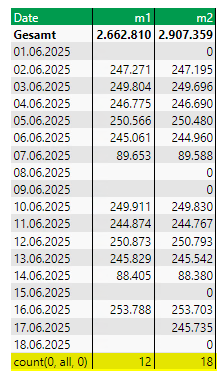
0
Hi Marlene,
I would create an additional calculated measure (m3): if sum(d-1, 0, m2) = 0 then 0 else 1
And then sum up the 1's in the m3 column.
BR / Ole
Hi, thank you, but how can I get the correct counts in the calculated row?
Give a try to hide the 0 in m2. Click left in "properties" - "visibility agent" and then hide the value=0 in m2. Maybe then it will be count the "right" way.
Try with:
Eventually, you should also hide m3 and m4 by means of 'Visibility'.
BR / Ole
Hi all,
Marcel Reinert unfurtunately visibility agent is not helping.
Ole Dyring thank you, this is working!!