Calculate with a dimension attribute on top of a hierarchy

I recently build a report in which I added a dimension attribute on top of a predefined hierarchy.
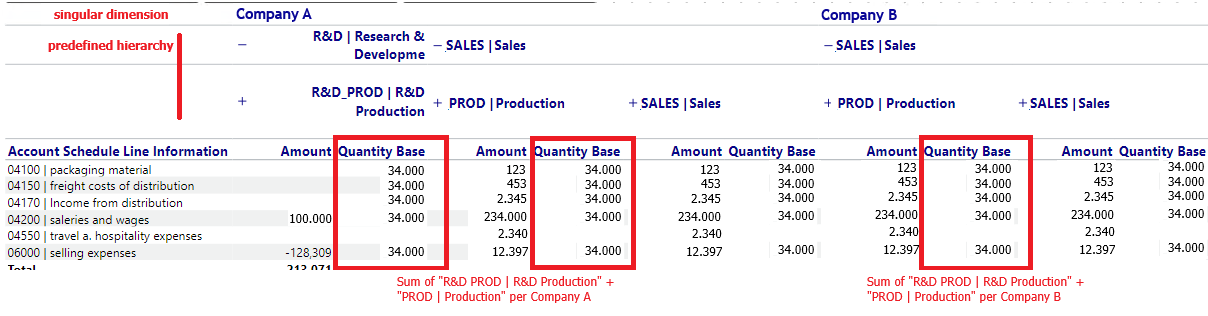
I am trying to sum up Quantity Base as a new measure here grouped by one Company. I only want to take specific Cost Centers from the second level of the underlying hierarchy. So for Company A the calculation should show 68.000 and for Company B 34.000. I can reference the Cost Center statically but the Company name will change.
I saw that there are calculations for predefined and custom hierarchies, but is there a solution when there is a mix of both? Or how can I attempt to calculate this?
1
Hi Dirk
I'm not sure that I completely understand what you are trying to do - but as far as I can follow you, it should be possible.
Levels are levels regardless of whether they come from predefined hierarchies only, custom hierarchies only or a mix.
If you use the calculation rowlevel(), you will get a result telling you which level a certain row in you crosstable is on.
You might also just go directly to the rowname calculation, which can search for a dimension value across all different levels, or you can add a paramater that specifies which level it should search.
I've composed an example in a table where you have a combination of Company attribute and a predeifned hiearchy:
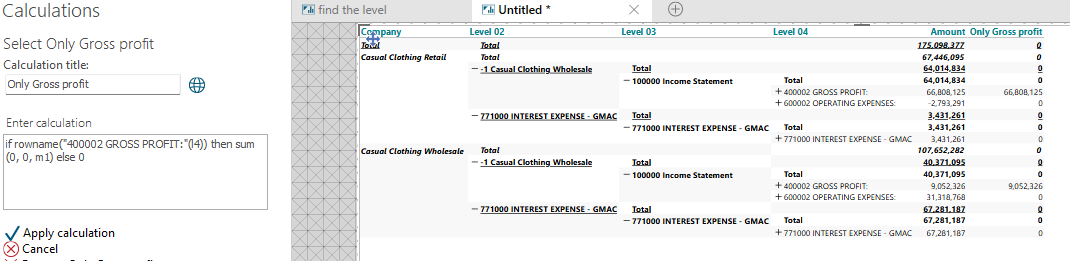
Check also the thorough explanation on the rowname calculation: https://community.targit.com/hc/en-us/articles/17792755367068-Rowname-and-Colname-calculations
And also the rowlevel calculation: https://community.targit.com/hc/en-us/articles/18121531598236-Row-level-and-Column-level-calculations-rowlevel-and-collevel
Hope it makes sense
Hi Niels thank you for answering,
Yes that is part of what I want to achieve. The next step would be to sum the calculation "Only Gross Profit" by Company.
Meaning a measure which aggregates only by Company: sum(0, 0(l1), m2). In other words the Total of "Only Gross Profit" for the current company.
In my example I calculated "Production Qty" = if colname("R&D PROD | R&D Production") then sum(0,0,m2) else 0 + if colname("PROD | Production") then sum(0,0,m2) else 0. The next step would then be to sum "Production Qty" by the Companies. Because I want to divide the Amount of "SALES | Sales" with the quantites of Production. with sample data: Company A SALES [04100|packaging material] = 123 / 68.000
ok - I think I get it now (and of course I should have said colname - not rowname :-)
I think you will need some intermediate calculations - and the key will be that if you can "isolate" the numbers you need for your calculation, then you can adress them alone.
There is no "Sumif" like calculation - therefore you need to first transport the numbers to another calculated measure and then do the calculation you really want.
A hint to the Company totals could be setting up a way to distinguish between the companies (also an intermediate).
Hope this gets you closer to a solution.
See the example below: