Total for different calculated measures

Hi all,
we build a table with 3 measues and need 3 more calculated measures.
But unfurtunately, the Total of the rows is not correct for the three measures.
I added an example with Sales demodata. The red cells show the values that are not correct and the green cells explain the needed result.
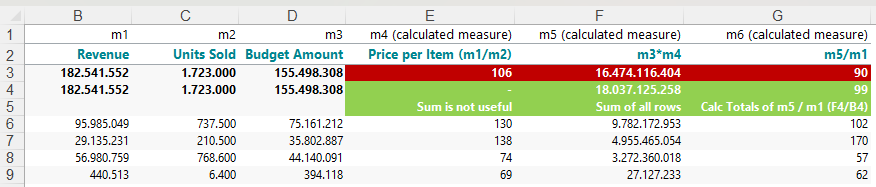
Is is possible to get the correct totals in TARGIT?
0
Hi Marlene
I guess TARGIT just does what it's supposed to - it make the division on all levels (including the total level) - but of course I understand your issue.
To make sure that the subtotal of your measure 5 is a sum of all the rows rather than a direct divsion on total level, I think you need one more calculation:
if allcount(0, all(c), m5) > 0 then sum(0, all(c), m5) else sum(0, 0, m5)
It's the one called m3*m4 (with total) in the screenshot below:

Once you add that calculation, the last one will be m6/m1 (because we now have an extra measure.
Now you just need to hide your intermediate calculation.
Hope it makes sense.
Hello Niels, Thank you for your prompt assistance. That looks great. I used the same logic with this if allcount(0, all(c), m) > 0 to disable the Total of Price per Item, because this Total does not make sense in this case in terms of business logic.
BR / Marlene