Remove "Undefined" in Calculation

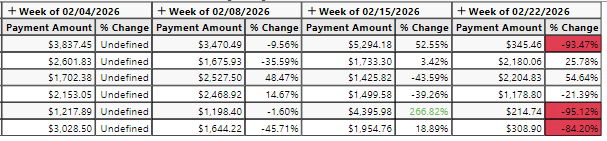
I'm using the following calculation for % change week over week: (sum(0, 0, m1) - sum(-1, 0, m1)) / sum(-1, 0, m1)
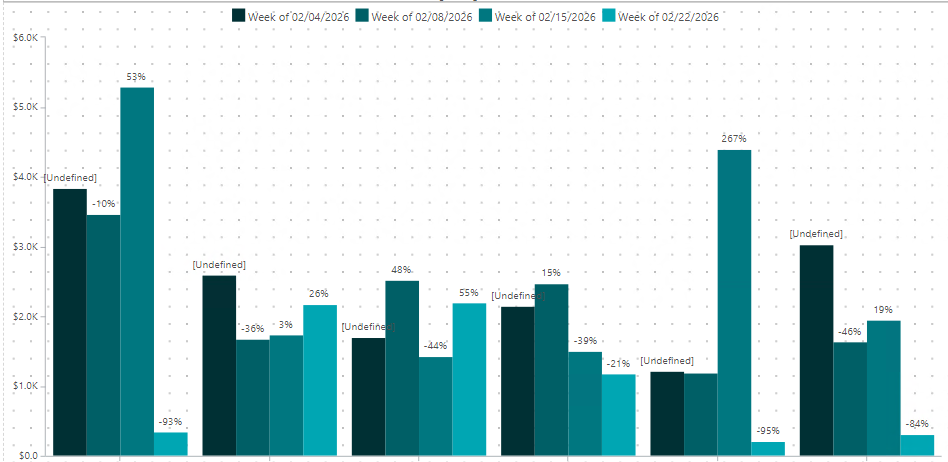
However, the first week is showing "Undefined". I just need to hide that value. I tried using the 4th parameter but I can't get it to work properly. Here are two screenshots of my crosstab and the resulting graph.
0
Hi Crystal, I think I have a solution for you to try:
You can create a visibility agent (properties > visibility agent).
Then use the Smart Agent "Hide Value" and you are going to select your calculated field % Change.
In the Agent Condition you will use sum(-1, 0, m1,0) = 0 then OK.
The sum(-1,0,m1,0) adds the 4th element 0 in the formula that is helpful when we have undefined value, it replaces by zero.
I hope it works :)
Hi Sarah,
Thank you so much! But it's strange - this solution worked for the crosstab but the "undefined" is still showing up in the bar graph. I'm wondering if the solution has to be done in the "properties" of the graph (photo below?) but I can't figure it out.
Hi Crystal,
I'm sorry it didn't help on the labels. There might be a workaround for this:
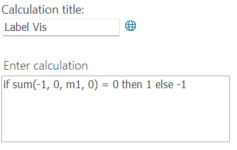
I suggest creating a new calculation, that would be a new measure that would for example show 1 if the % is undefined or -1 if it has a value:
 Then you will hide this new calculation from your chart in Properties, Format Visibility, just uncheck the new measure.
Calculations > Custom Calculation > As a new measure
Calculation Title could be anything, I've called mine LabelVis. Calculation: if sum(-1, 0, m1, 0) = 0 then 1 else -1
Now on your chart properties, in the labels section, you will go to labels properties and choose from the + sign <New Conditional Text>.
It will show an IfThenElse1 under the Labels box.
In the "If" box you can select your new calculation from the + sign and add a condition < 0.
In the "Then" box you select your % calculation.
This condition will show the label % calculation if the LabelVis = -1.
Not sure that will work, I hope it does. Please let me know :)
It worked!!!! Thank you Sarah!!!