Export to Excel should support Consumer Editing

Hello everyone,
We found a strange bug in our reports regarding the Export to Excel function.
When a table is edited in Consumer Editing and the table is linked to another layout, then the table in the other layout also changes, which is good. If we trigger an export to Excel on the "Active Layout" the Consumer Editing is also exported, which is also correct. But if we trigger an Export to Excel to export the other layout (linked), then the Consumer Editing is suddenly disregarded.
Here is an example why that is important in our case:
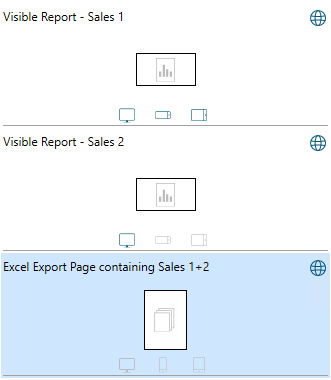
In our case we have a report with 2 dashboards. Both dashboards have an "Export to Excel" button on top. This button should export one Excel file with both tables, so one button to export the whole report. To do that we created a Excel Export page as a report page which contains both (bottom layout in the image). The "Export to Excel" button triggers: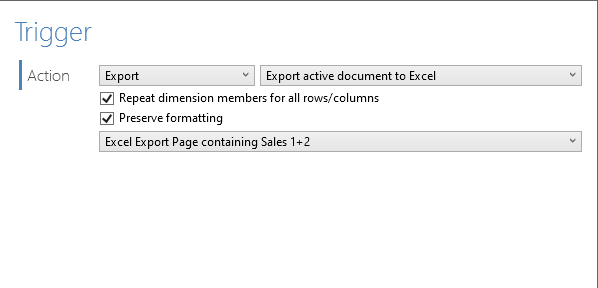
This works so far so good.
But we also wanted to add Consumer Editing to the report. When a Consumer edits the dashboards and the tables between the Dashboard and Excel Export page are linked, then the tables both change. If you are in Anywhere you can see that the Excel Export page changes with it, but when exported by referencing the page it does not export the changes done with Consumer Editing. If you change the button to Export Active Layout then it works.
Is this intended behavior or why is Consumer Editing not working with this type of Export?
Best regards
Comments
Hi Dirk,
Please report this issue to our official support, here: https://www.targit.com/company/support
Make sure that you include information about the version of the TARGIT Server. Cloud or on-prem. If on-prem, include the version and build number.
BR / Ole
Please sign in to leave a comment.