Change object properties to pre-select only visible series/measures as default

Hi,
Current behavior: At the moment, when you open the properties of a chart object and want to change the color or visualization settings of a specific measure or series, the first measure in the object is pre-selected by default, even when that measure is hidden through the visibility settings.
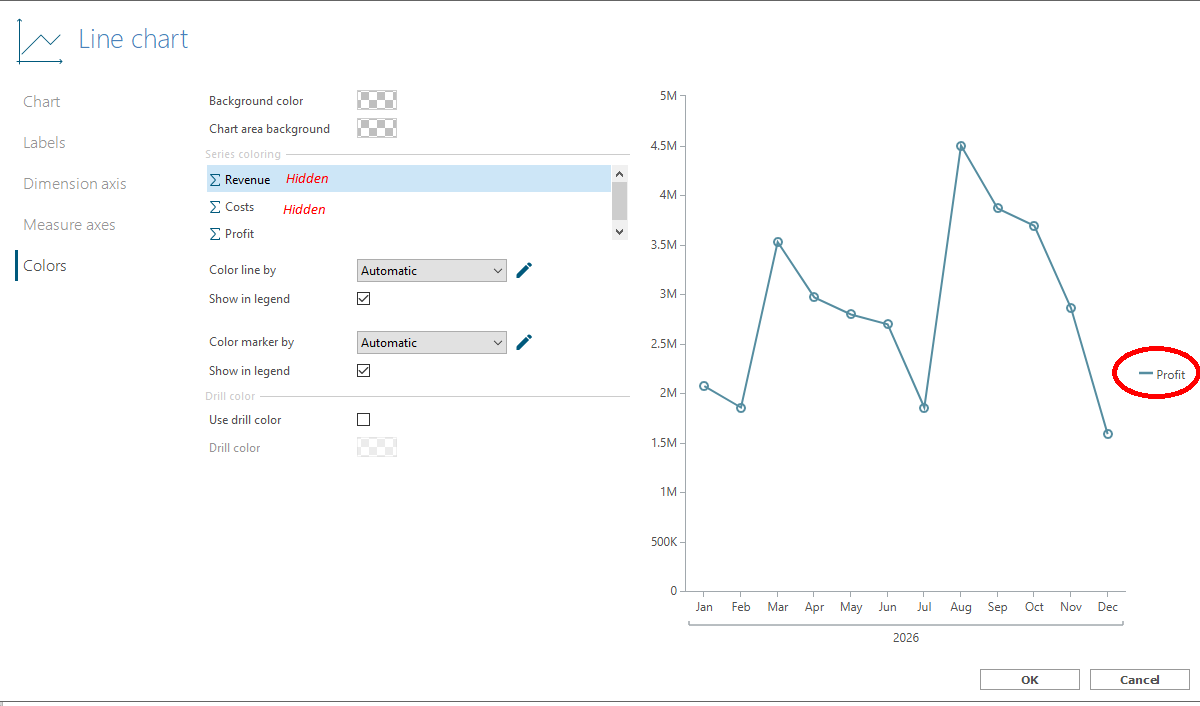
Problem: This often leaves less experienced designers confused when changing, for example, the color of a series in a chart containing hidden series/measures due to calculation. They end up changing the color of a hidden measure instead of a visible one and then have to spend a minute figuring out why the color isn't changing in the chart.
This often happens when new measures or columns have been calculated in a chart, which, dare I say, is quite common practice ;)
New behavior: To avoid this and save designers valuable time, I propose that the object properties pre-select only visible series/measures by default. In the above example, "Profit" should be automatically selected, as it is the only visible measure.
Comments
0 comments